
9
researched presets, masks compiled from published file-format lists
1
screen for the whole routing table, reviewed as a set and applied at once
MIT
licensed, and scoped to a single registry key
Free
no tiers; it reads IDM’s settings rather than replacing them
Written the way IDM writes it in IDM’s own format.
| What | IDM's dialogs | IDM Download Router |
|---|---|---|
| Where the routing lives | spread across a stack of dialogs | one screen, side by side |
| Changing a set of folders | one dialog at a time | reviewed as a set, one Apply |
| New category wiring | by hand | unique ID, mask, pathW as REG_NONE (UTF-16LE) |
| Picking up your changes | IDM caches the registry | force-restarts IDM when the category set changes |
One screen, reviewed as a set and one Apply.
Nine researched presets
Compressed, Documents, Music, Programs, Video, Images, Disk Images, Subtitles, Torrents — extension masks compiled from published file-format lists, not guessed.
The tweaks beside them
Clipboard monitor, launch on startup, browser integration, tray icon, temp and partial folders — the settings you otherwise hunt for.
Single Apply
Everything commits at once. When the category set changes, IDM is restarted so it actually picks the new routing up.
Scoped to one key
Reads and writes only HKCU\Software\DownloadManager, and the app's own config lives beside it — nothing else on the system is touched.
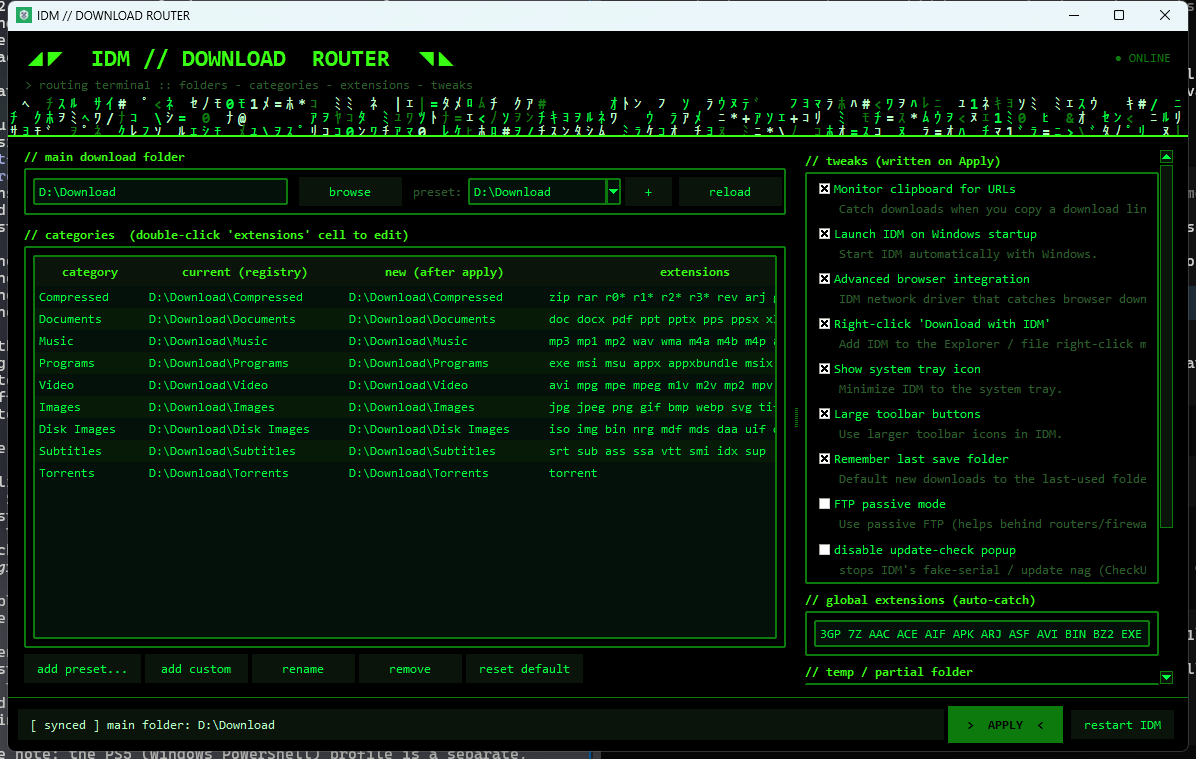
From scattered to set without a dialog each.
Read the registry as it stands
Including the categories you added directly inside IDM — they show up like any other row.
Arrange and edit
Apply a preset, double-click a cell to edit an extension mask, adjust the global auto-catch list.
Apply once
Every change commits together; IDM restarts when the category set changed, because otherwise it would keep serving the old routing.
Press
Writing about it? The kit is open.
Screenshots and the icon at every size, boilerplate in two lengths, the fact sheet and the palette — free to publish without asking, and downloadable as one zip.
Open the IDM Download Router press kitNo embargo · review copies on request

Questions
Is it safe?
It reads and writes only HKCU\Software\DownloadManager — the same key IDM's own dialogs edit — and stores its own config separately. If you want a belt on top, reg export the key first; the README shows how.
Will IDM notice the changes?
Yes. IDM caches and rewrites the registry, so the router force-restarts it when the category set changes rather than leaving the edit half-picked-up.
What are the presets based on?
Nine categories whose extension masks were compiled from published file-format lists — archives, video, audio, image, document — rather than invented.
Does it run on macOS or Linux?
No. It is a Windows tool for a Windows program; the registry format it mirrors is the whole point.
IDM still saves to a folder I didn't choose. Why?
In IDM every category keeps its own folder, and a download goes to the folder of the category its extension matches, not to the main folder. The router puts the main folder and every category on one screen so they are set together. If IDM's Remember last save folder is on, new downloads default to the last folder you used; the router lists that setting with its other tweaks.
Can each category point at a different drive?
Not from the router. Applying sets the main folder and writes each category's folder as a subfolder named after the category inside it. For a category somewhere else entirely, set that one path in IDM's own options afterwards, and note that the router's next Apply resets it to a subfolder.
Does the Torrents preset mean IDM can download torrents?
No, IDM does not download torrents. The preset routes .torrent files, the small metafiles you open in a torrent client, into their own folder.
How do I move my categories to a new PC?
Everything IDM uses, categories included, lives under HKCU\Software\DownloadManager in the registry: export that key with reg export and import it on the new machine. The router keeps its own presets in %APPDATA%\IDM Folders Changer\config.json, so copy that too if you want them back.
Set the folders once, and stop fixing them after.
Every IDM category and the folder it writes to on one screen, reviewed as a set and written in a single Apply — instead of nine trips through a settings dialog.
Download for WindowsFree · MIT · Windows 10 and 11
Built by a one-person studio. If it has earned a place in your day, you can help fund the next release →
IDM Download Router