
1
command to install, and one flag to undo it
tmux
covered — the case the stock macOS setup silently misses
0
configuration to maintain; it survives system updates
MIT
licensed, and the script that edits PAM is published in full
Two commands, once then never again.
The stock configuration is one line in the wrong file — this puts it in the right one.
brew install
The formula arrives from the studio's tap, with pam-reattach alongside it for the tmux case.
sudo touchid-sudo
Writes the pam_tid.so line into sudo_local, the file macOS 14+ created for exactly this kind of local override. Unrelated lines are preserved.
Then just use sudo
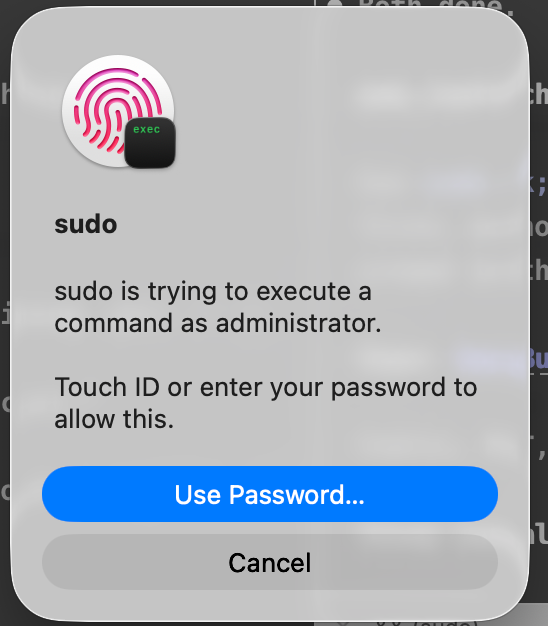
A fingerprint instead of a password — in a terminal, in an IDE, and inside tmux, which is the case the stock setup always missed.
What the script actually does in the order it does it.
| Stage | What happens |
|---|---|
| Preflight | macOS, Sonoma-or-later include line, pam_tid.so present, fingerprint enrolled |
| Backup | previous config saved to /etc/pam.d/sudo_local.bak |
| Validation | runs sudo -n as you afterwards and inspects the result for PAM errors |
| Rollback | restores the backup automatically if validation fails, and exits non-zero |
| Idempotent | re-running changes nothing; unrelated lines in sudo_local are preserved |
brew install abd3lraouf-studios/tap/macos-touchid-sudo
sudo touchid-sudo
Homebrew is the recommended path; a curl installer is in the README.
The security answer — one fewer keylogger surface.
sudo still requires local presence and a biometric match, and falls back to your password rather than around it. The meaningful change is that a sudo prompt no longer traverses your keyboard, which removes one keylogger surface. Anyone who can already run code as you is not stopped by either mechanism.
The install script is short and readable, and it is the thing running as root: read it before you run it. Preflight, backup, validation and rollback are all in the table above, not in the marketing copy.
Press
Writing about it? The kit is open.
Screenshots and the icon at every size, boilerplate in two lengths, the fact sheet and the palette — free to publish without asking, and downloadable as one zip.
Open the Touch ID for sudo press kitNo embargo · review copies on request

Questions
Does it survive macOS updates?
Yes. sudo_local is the file Apple ships for local PAM overrides, and system updates leave it alone. That is the whole reason the line goes there and not into sudo's own file.
How do I undo it?
sudo touchid-sudo --disable reverts to password-only sudo, then brew uninstall removes the tool.
Why doesn't the stock setup cover tmux?
tmux runs sudo in a server process outside your terminal session, so the Touch ID prompt never reaches it. pam-reattach bridges that, and the installer wires it in when it is present.
Is the installer safe to run?
It runs as root, so read it first — it is one short script. It preflights, backs up sudo_local, validates with sudo -n, and rolls back on any failure.
What happens over SSH, or with the lid closed?
You type your password as usual. Touch ID is added as sufficient, not required, so when the sensor is unavailable (over SSH, with the lid closed, on a Mac without one) sudo falls through to the password.
It works in Terminal but not in VS Code or a JetBrains IDE. Why?
Those editors run sudo in an embedded terminal that may not be attached to your login session, which is the same reason tmux misses the prompt, and pam-reattach fixes both. Install it with brew install pam-reattach and run sudo touchid-sudo again to wire it in.
I'm on an Intel Mac, or I use MacPorts. Will it find pam-reattach?
Yes. It looks under /opt/homebrew, /usr/local and /opt/local and writes the full path of the module it finds. The module is added as optional, so if an upgrade later moves it, sudo falls back to your password instead of locking you out.
Does it work on macOS 13 Ventura or earlier?
No. It needs macOS 14 Sonoma or later, because earlier versions have no /etc/pam.d/sudo_local. It checks that /etc/pam.d/sudo includes sudo_local and refuses to run otherwise, and it never edits /etc/pam.d/sudo itself.
Your fingerprint, even inside tmux.
sudo answers to Touch ID instead of a typed password — including in tmux, where the usual setup quietly stops working. One Homebrew command to put it in place.
Get it on GitHubFree · MIT · macOS 14 and later
Built by a one-person studio. If it has earned a place in your day, you can help fund the next release →
Touch ID for sudo