
2
stems out of one pass — the isolated vocal and the instrumental together
All
GPU vendors run it: Metal, CUDA and DirectML, with a CPU engine where there is none
0
uploads — every model runs on your own machine, so the track never leaves it
Free
no tiers, no watermark and no account
Built like a studio tool given away free.
Fast and Max models
The RoFormer model family UVR5 uses, offered at two qualities. Fast for a quick pass, Max when the mix is dense.
Both stems, one pass
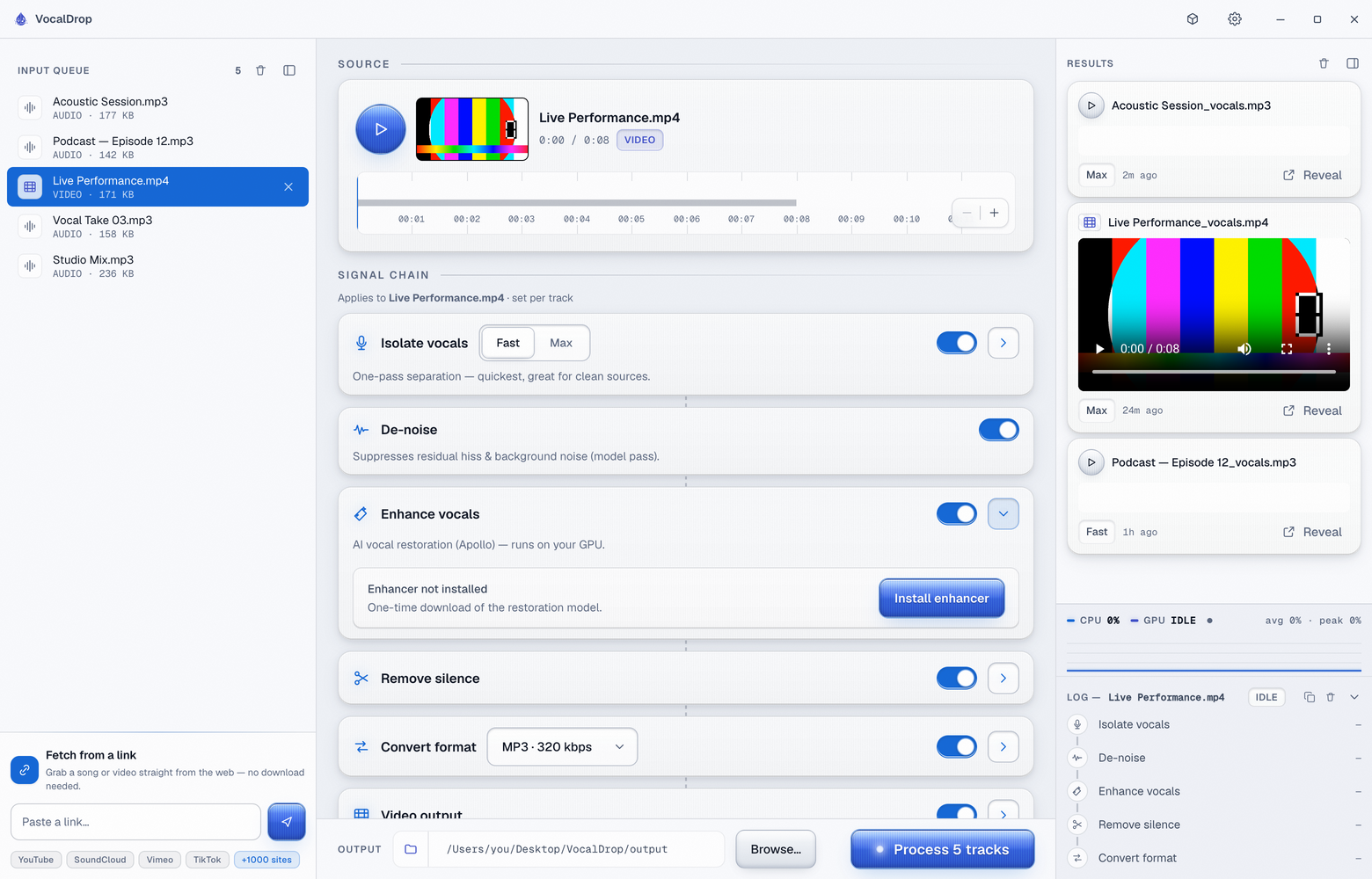
Switch on Keep stems and the instrumental lands beside the isolated vocal in the Results feed — separation is one job, not two runs.
Video too
Drop a music video or a movie clip; the audio is extracted, separated, and the stem you chose is re-muxed back in sync.
Or just paste a link
YouTube, SoundCloud, Vimeo, TikTok and a thousand-odd more, fetched with the real title and artwork — no separate downloader in the way.
Two passes, depending on the mix.
VocalDrop is built on the RoFormer separation models, run locally. One model runs per mode — nothing is blended behind your back, so what you hear is what that model produced.
Bring the audio in
A file, a folder, or a pasted link. Video is de-muxed, separated, and can be re-muxed back in sync with whichever stem you kept.
Fast — BS-PolarFormer
A compact RoFormer that runs on the GPU — Metal on Apple Silicon, CUDA on NVIDIA — and turns a track around in seconds. On AMD/Intel graphics, Kim Vocal 2 runs on the GPU via DirectML instead. Enough for a clean source.
Max — BS-Roformer 1296
A single, much larger pass for the highest fidelity. Slower, and the one to reach for on a dense mix.
Both stems land together
With Keep stems on, the vocal and the instrumental come out of the same run, so a karaoke bed costs nothing extra.
How good, ranked by measured quality.
| Tier | Model | Size | Vocal quality | Speed on GPU |
|---|---|---|---|---|
| Max | BS-Roformer 1296 (viperx) | 609 MB | ★★★★★ 12.10 SDR — median of 40 tracks, independently scored | seconds on CUDA/Metal, ~10 min on CPU |
| Fast | BS-PolarFormer | 97 MB | ★★★★☆ 11.00 SDR — on the MVSEP Multisong set | seconds |
| Fast (AMD/Intel) | Kim Vocal 2 (MDX) | 66 MB | ★★★☆☆ 10.18 SDR — median of 40 tracks, independently scored | seconds on DirectML |
| Post-stage | Apollo Vocal Restorer | 194 MB | restoration — repairs lossy/dull vocals | runs after isolation |
| Post-stage | MelBand De-noise | 870 MB | denoising — strips hiss and bleed | runs after isolation |
Against the usual suspects — the ones that upload your audio.
| Compared on | VocalDrop | UVR5 | LALAL.AI | MVSEP | Moises | iZotope RX |
|---|---|---|---|---|---|---|
| Audio never uploaded | yes | yes | no — uploads | no — uploads | no — cloud | yes |
| Free, unlimited | yes | yes | no — per-minute | no — queue-limited | no — subscription | no — $199+ |
| SOTA separation (RoFormer) | yes | yes | partial | yes | partial | no |
| GPU on every vendor | yes — Metal · CUDA · DirectML | yes — a separate build per vendor | n/a | n/a | n/a | yes |
| Automatic GPU setup | yes — one-time, in-app | no — manual | n/a | n/a | n/a | n/a |
| Full chain: isolate → denoise → restore → silence → convert | yes | no — manual chaining | no — separation only | no — separation only | partial | no — manual |
| AI vocal restoration (Apollo) | yes | no | no | no | no | no |
| Link ingestion (YouTube, 1000+ sites) | yes | no | no | no | no | no |
| Video in → synced video out | yes | no | no | no | partial | no |
| One-click install | yes — about 245 MB | no — 1.6 GB + Python | n/a | n/a | yes | yes |
| No account required | yes | yes | no | no | no — required | yes |
| New models without app update | yes — remote catalog | no | yes — server-side | yes — server-side | yes — server-side | no |
vocaldrop vocals song.mp3 --quality maxEvery option the app exposes, with --json for pipelines.
Your audio never leaves the machine — and the diagnostics that do.
Most free vocal extractors are websites that upload your audio to someone else's server. VocalDrop runs the models locally on your own CPU or GPU, so the audio is never sent anywhere, and there is no track limit, watermark or subscription attached to the decision.
What does leave the machine, stated plainly: anonymous crash and usage diagnostics — never file contents, never paths, never personal data — the one-time engine and model download on first launch, a URL if you paste one in for the app to fetch, and the update check if you leave it on. That is the complete list.
Press
Writing about it? The kit is open.
Screenshots and the icon at every size, boilerplate in two lengths, the fact sheet and the palette — free to publish without asking, and downloadable as one zip.
Open the VocalDrop press kitNo embargo · review copies on request
Questions
What model does it use?
The RoFormer family, the same architecture UVR5 ships, run through audio-separator — as a native desktop app, with no Python setup and no dependency roulette. Max is BS-Roformer 1296 on every machine (GPU on NVIDIA and Apple Silicon, CPU on AMD/Intel where DirectML cannot run it). Fast is BS-PolarFormer, or Kim Vocal 2 on AMD/Intel graphics where it runs on the GPU via DirectML. Two optional post-stages — MelBand de-noise and the Apollo vocal restorer — polish the result.
Is it really free?
Yes. Free to use, with no watermarks, no track limits, no feature paywall and no account. It is closed source; the public repository holds the downloads and the README.
Does it need the internet?
Only to download your model on first use — about 100 MB for Fast, 600 MB for Max. The Python engine itself ships inside the installer. After that separation is entirely offline (an NVIDIA machine also fetches its one-time CUDA package when you enable acceleration).
What about my files?
They are processed on your machine and never uploaded. VocalDrop does send anonymous crash and usage diagnostics — never file contents, file paths or personal data — and the only other network calls are the one-time model download, a URL you paste in yourself, and the optional update check.
Which Macs and PCs?
Apple Silicon Macs (M1 to M4) and Windows 10 or 11 on x64. Intel-Mac and Linux builds are not provided today. Separation is GPU-accelerated on both: Metal on Apple Silicon, and on Windows the app detects your GPU at launch — an NVIDIA card gets an automatic one-time CUDA setup, AMD/Intel graphics run on DirectML, and everything else uses the optimized CPU engine.
Why does my Mac say it cannot open it?
The current builds are not code-signed or notarized yet, so Gatekeeper objects on first launch: right-click the app and choose Open. On Windows, SmartScreen wants More info, then Run anyway. Signed builds are on the roadmap.
Can I automate it?
Yes — a full CLI ships inside the app and mirrors everything the interface does, with --json output for pipelines. macOS also gets right-click Quick Actions in Finder.
What is BS-PolarFormer?
It is the model behind Fast mode on NVIDIA and Apple Silicon: a compact float16 checkpoint of about 97 MB from the open-source Music-Source-Separation-Training project, fetched from that project's own release on first use. On AMD and Intel graphics, Fast runs Kim Vocal 2 on DirectML instead.
What does SDR mean in the models table?
Signal-to-distortion ratio, in decibels: how much of a separated stem is the wanted source rather than leakage and artefacts. Higher is better. The same model scores differently on different test sets, so compare figures within one source rather than across websites.
Can it split lead from backing vocals, or pull out drums and bass?
Not today. A run separates the vocal from everything else, and with Keep stems on the instrumental is saved beside it, so harmonies stay with the lead. Drums, bass and piano are on the roadmap as further stem targets.
The vocals come out, and nothing goes up.
Separation runs on your own CPU or GPU, so the track never leaves the machine and there is no queue to wait in. One download for macOS or Windows.
Free · macOS and Windows
Built by a one-person studio. If it has earned a place in your day, you can help fund the next release →
VocalDrop